



AI Image-to-Sheet Title and Description Generation
The AI Image-to-Sheet feature allows you to quickly generate a title and description for your product based on the image you upload. This helps streamline the setup process and reduces the need for manual entry.
How to Use This Feature
- Navigate to your Image to Sheet tab.
- Click Add Products.
- Upload your image.
- Once uploaded, locate the Generate Title or Generate Description buttons.
- Click either button to automatically generate content based on your image.
- Review the generated title and description.
- Make any edits if needed, then continue with your product setup.
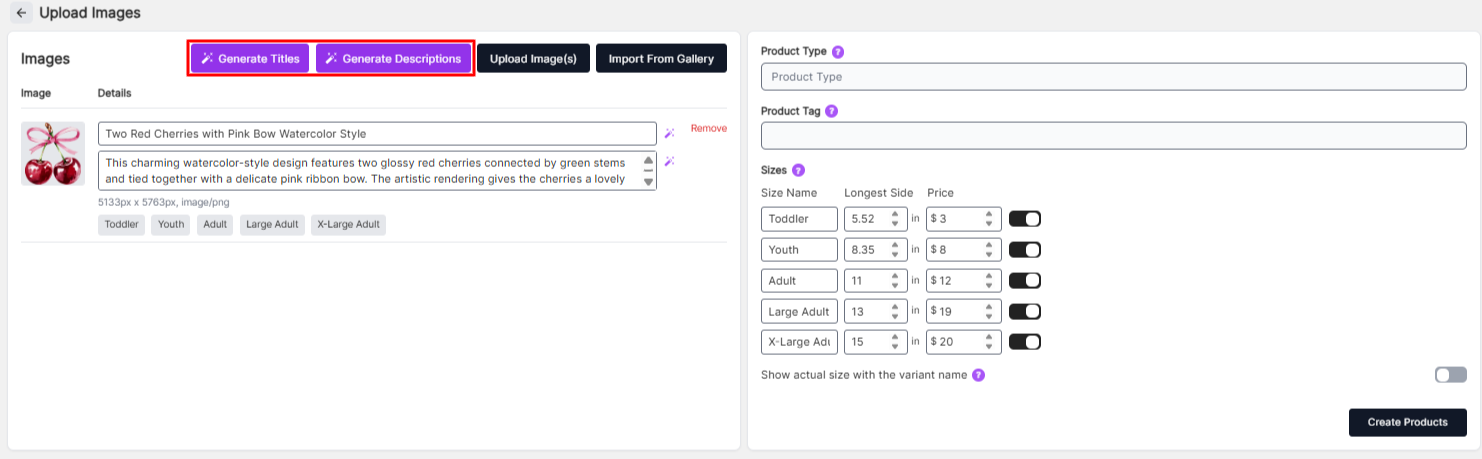
Use the Generate Title or Generate Description buttons to automatically create content.
How It Works
After uploading your image, the AI analyzes the visual content and generates a suggested title and description that best match the design. This helps ensure your products are labeled clearly and consistently.
Why Use AI Generation?
- Save time when uploading multiple products
- Automatically generate relevant titles and descriptions
- Improve organization and consistency
- Reduce manual typing
Important Note
AI-generated titles and descriptions are suggestions and may not always be perfect. Be sure to review and adjust the content as needed before saving your product.