



Image-to-Sheet Product Mapping
The Image-to-Sheet Product Mapping feature helps you connect images listed as products on your website to your Image-to-Sheet setup. This is useful when those images already exist on your site but are not yet connected to the app.
How It Works
If your website already has images listed as products, our app can help detect and map them. Once mapped, those images become connected to Image-to-Sheet, making them available to use within your Image-to-Sheet product flow.
When to Use This Feature
Use this feature when you already have images listed as products on your website and want to connect them to Image-to-Sheet without manually recreating them inside the app.
How to Map Existing Images as Products
Go to your Image-to-Sheet Products section and click Map Existing. From there, choose the images listed as products that you want to connect to the app. After confirming your selection, the selected items will be mapped and linked to your Image-to-Sheet setup.
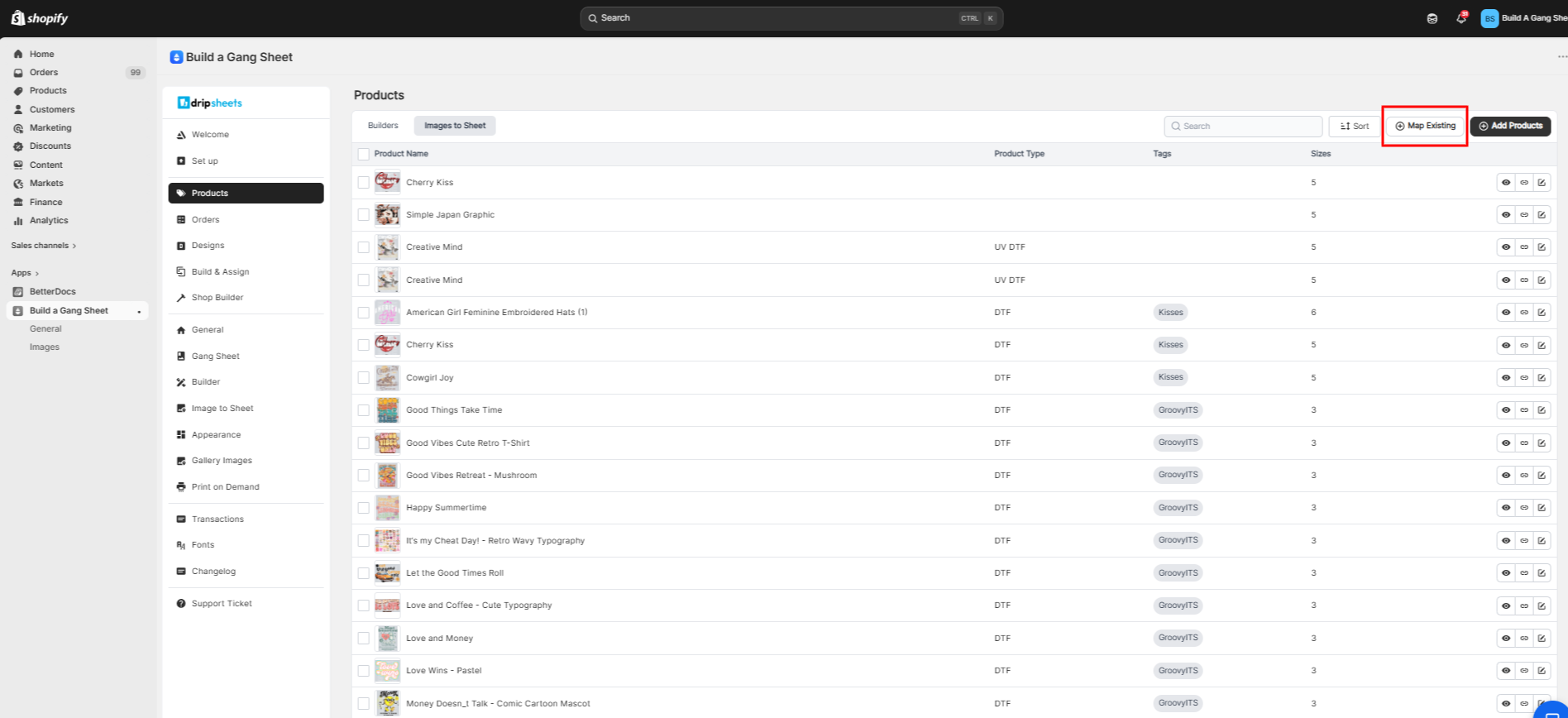
Use Map Existing to connect images listed as products on your website to Image-to-Sheet.
What Happens After Mapping
Once mapped, your images as products are connected to Image-to-Sheet. Existing image and product details are preserved, so there is no need to duplicate or re-upload them.
Important Note
Mapping does not change or remove your existing listings. It simply connects them to the app. If an image listed as a product does not appear, make sure it is publicly accessible on your website and properly loaded.